


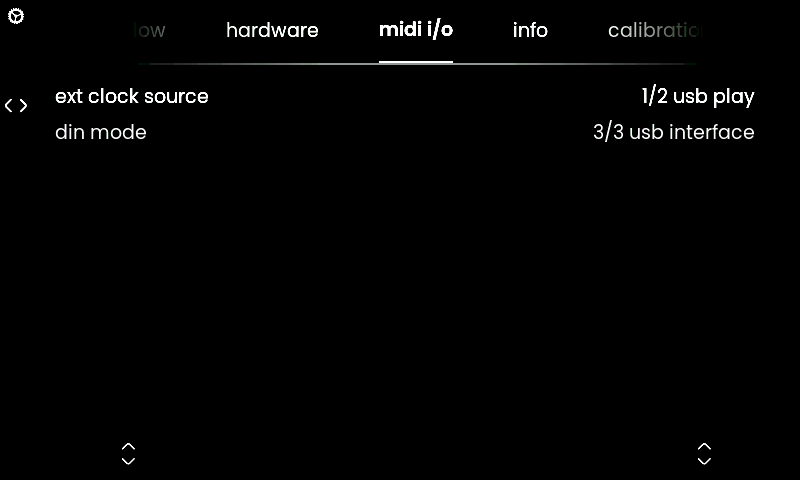
The ‘midi i/o’ tab lets you adjust the routing of the inputs and outputs of Osmose CE’s MIDI ports to better suit your needs.
ℹ DAW control mode is not listed in this tab as it is only meant for MIDI communication with your DAW and Ctrl-e and does not send or receive MIDI note information.
ext clock source selects the MIDI port used as the MIDI clock source for synchronization of the arpeggiator. Available clock sources are:
1/2 usb play (default) : checks USB MIDI Port 1 for an incoming MIDI clock signal
2/2 din : checks the physical DIN MIDI input for an incoming MIDI clock signal
din mode adjusts the behavior of the 5-pin DIN style jacks.
1/3 default (default) : DIN MIDI outputs the keyboard-generated MIDI data as set up in the External MIDI mode. It mirrors the data that is sent on USB MIDI Port 1 of Osmose CE (‘play’ port).
2/3 thru : just like ‘default‘, but additionally, any MIDI data that enters in the DIN MIDI input will be forwarded to the DIN MIDI output.
3/3 usb interface : just like ‘default’, but additionally, this option allows your USB host (computer) to send and receive MIDI messages via the DIN MIDI ports of Osmose.
Once set, use USB MIDI Ports 3 (the ‘din’ ports) in your host (computer) to control what is sent or received.

