

DAW script troubleshooting Ableton Live

Sep 16, 2026
13

If your Osmose CE doesn't automatically offer DAW Control when connected to your computer that runs Ableton Live, although you are on Ableton Live 12.4 or higher, please use the following procedure:
- Power off your Osmose CE
- Go to ‘Live > Settings… > Link, Tempo & MIDI’
- In the ‘MIDI’ section, deactivate communication with unused control surfaces by setting these fields:
- Control Surface → None
- Input → None
- Output → None
- Activate communication with your Osmose CE device by setting fields to:
- Control Surface → Osmose CE
- Input
- macOS:
Osmose CE 49 → Osmose CE 49 daw control
Osmose CE 61 → Osmose CE 61 daw control - Windows:
Osmose CE 49 → MIDIIN3 (Osmose CE 49)
Osmose CE 61 → MIDIIN3 (Osmose CE 61)
- macOS:
- Output
- macOS:
Osmose CE 49 → Osmose CE 49 daw control
Osmose CE 61 → Osmose CE 61 daw control - Windows:
Osmose CE 49 → MIDOUT3 (Osmose CE 49)
or Osmose CE 61 → MIDOUT3 (Osmose CE 61)
- macOS:
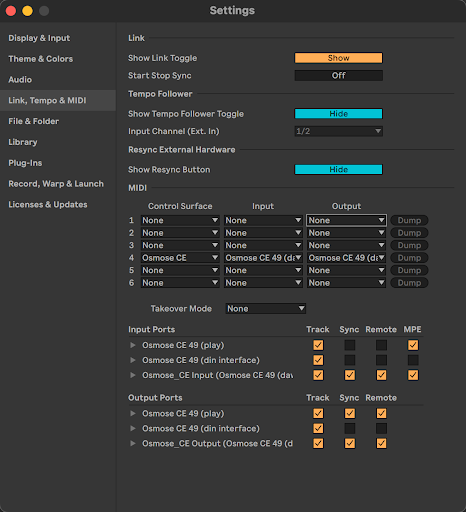
- Power on your Osmose CE

