


rear panel
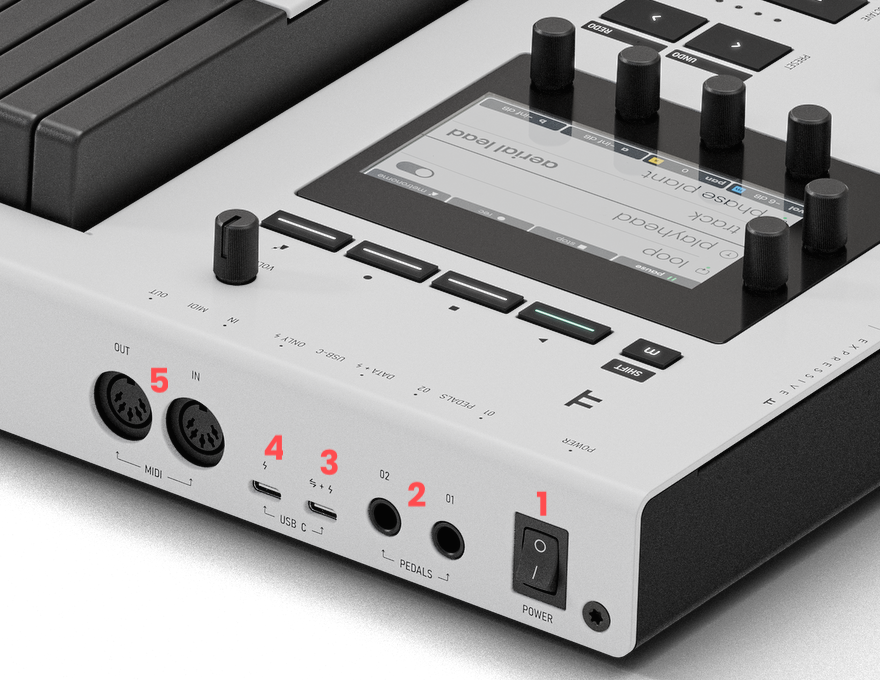
1 power switch - Turns Osmose CE on and off
2 pedals inputs - Two 1/4" TRS jack inputs for continuous control of parameters. Not all pedals are supported, and they need to be calibrated before usage, see pedal calibration.
3 USB-C data + power port - Class-compliant USB for bidirectional MIDI communication with a computer or host. Also used to bus-power Osmose CE when the host supports it (minimum 3.0 A).
4 USB-C power port - USB-C port for power only. Connect this port to a USB power supply if your USB host device is unable to provide bus power via the Data+Power USB-C connector. For example, a computer without USB-C ports.
5 MIDI DIN IN/OUT- Standard 5-pin connectors for communication with MIDI devices.
front panel
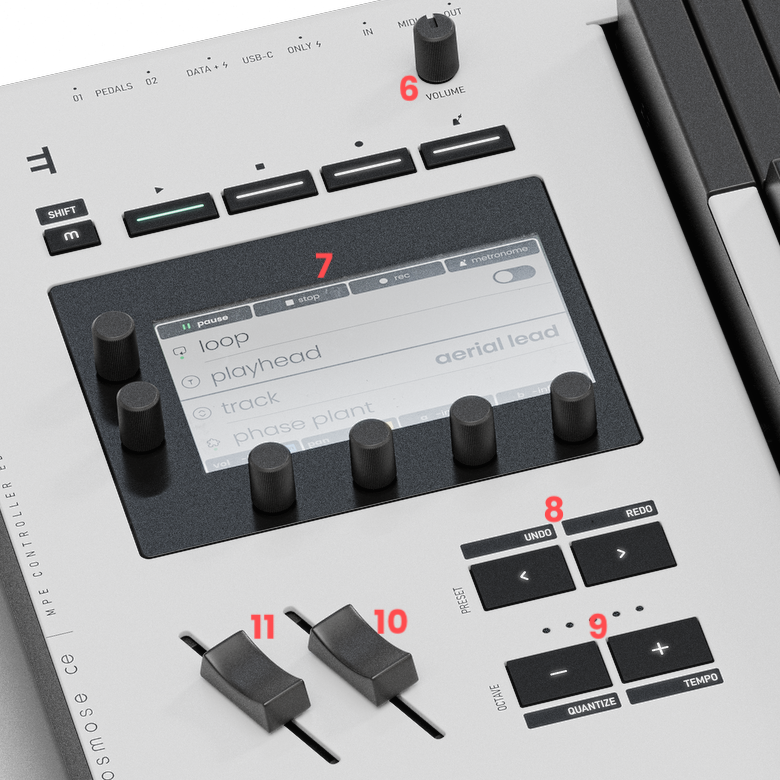
6 volume knob - controls the master output volume of your DAW for DAWs that are supported for Osmose CE’s DAW Control mode..
7 main control Interface - access to all of Osmose CE’s parameters, see main control
8 preset buttons (< and >) - select the previous and next preset. The black labels above indicate shift functions (undo and redo) when Osmose CE is set to DAW Control. If used with Ctrl-e, these buttons will select the previous or next instrument preset.
9 octave buttons (- and +) transpose the keyboard up or down in octaves. The LEDs indicate the current keyboard transposition state. The black labels below indicate shift functions (quantize and tempo) when Osmose CE is set to DAW Control.
10 modulation slider - The modulation slider works like a standard modulation wheel and sends MIDI CC#1 by default. Its assignment can be changed in the controllers tab.
11 pitch bend slider - This spring-centered pitch bend slider controls the global pitch bend.

